
My Original Multimedia Project
I chose to update a multimedia project that I created in a previous blog post. After evaluating my project, I realized that there were a few aspects I could improve upon using the skills I have learned in order to enhance the effectiveness of the learning material. The goal of this multimedia learning material is to teach the learner how to complete the task of posting a picture on the social media platform Instagram.
My Updated Multimedia Project
Managing Intrinsic Load
Upon viewing my original project, I noticed that the main downfall is that I did not have any elements to direct the learners attention to the various steps of the process of posting a picture, I only had my computer mouse to highlight features of the instagram page. As well, the browser screen was very busy, this can be distracting and increase extraneous load as it overwhelms the learner with information.
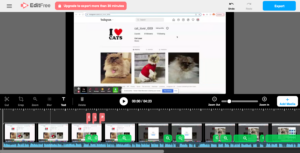
Alt Text: My multimedia project displayed in Screencastify’s editing software
To correct this, I edited my video in Screencastify’s video editing software. I utilized the “zoom” feature in order to manage intrinsic load and utilize the Signalling Principle from Mayers Theory of Multimedia Learning. By “zooming” into the elements of the process while I narrate them, I was able to highlight to the learner what is important and limit the view of what isn’t. From the same theory, I also utilize the the Contiguity Principle by using labels to highlight the “display picture”, the “username handle” and the “photo feed” and keeping these labels close in proximity to the features they are associated with. The Redundancy Principle states that on screen text can be unnecessary when visuals and narration are used due to the Dual Coding Theory’s explanation of audio and visual information processing. However, in this case, the text is used strictly to label features of Instagram’s platform and the Modality Principle related to managing intrinsic load suggests that text can be beneficial if the words are unfamiliar to your learners. I kept this in mind and considered the intrinsic load of my intended audience, as intrinsic load can vary depending on the audience. I decided to use these labels because a learner who is unfamiliar with the Instagram’s platform and is learning to post a picture may be unfamiliar with the names of the various features such as “display picture”, “username handle”, and “photo feed”. In this case, labels would help manage intrinsic load rather than adding to extraneous load.
Enhancing Accessibility
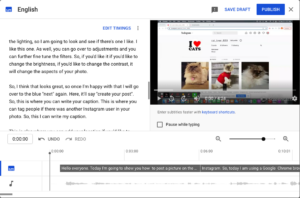
Alt Text: My multimedia project displayed in the Youtube subtitle editor
When I posted my original project to Youtube, my video had the auto generated closed captioning but I did not edit or inspect them. The auto captioning is often incorrect and does not include proper punctuation, when I inspected them for my upgraded project, I found this to be the case. In Svetlana Kouznetsova’s TEDtalk, she describes how to edit the closed captions and recommends having a transcript in addition to captions. I followed her instructions and made both of these changes to my updated project and found editing the captions to be a simple task that makes a substantial difference in the quality of the captions. These changes make my project more accessible as the correct and legible captions are available to those who can benefit from them, which is not only limited to those who are hearing impaired, as the University of Washington suggests. All learners can benefit and the absorption of the content is enhanced when proper captioning is available.
Leave a Reply